Arduino is an open-source platform used for building electronics projects. Arduino consists of both a physical programmable circuit board (often referred to as a microcontroller) and a piece of software, or IDE (Integrated Development Environment) that runs on your computer, used to write and upload computer code to the physical board.Additionally, the Arduino IDE uses a simplified version of C++, making it easier to learn to program.
Arduino Pin Configuration
Analog Pins :- Analog pins work on Analog signal which may vary from 5V to 0V , There are 6 Analog pins in Arduino uno
Digital pins - Arduino have 14 digital pins, digital pins have digital signal ( high or low )
PWM - pwm stand as pulse with modulation it work on signal which are in pulse form , pin (3,5,6,9,10,11) are pwm pins in Arduino uno
This type of pins used to control speed of motor or intensity of bulb etc.
Arduino ide
The open-source Arduino Software (IDE) makes it easy to write code and upload it to the board. This software can be used with any Arduino board.
Arduino Code
Arduino code written in cpp, it have major two function
1. void setup();
2. void loop();
1. void setup() -
This function contain the information about pinMode which pins is for INPUT or OUTPUT. Or for many other functions some mostly used function are pinMode() , Serial.begin();
2. void loop();
Code which is execute again and again written into loop( ) function.
Other Important Functions
There are some other functions which are used inside or outside of loop( ) and setup( ) function
1. delay( ) -
delay function used to take delay of some time it take times in milliseconds as its parameter
1second == 1000 miliseconds
For 1second delay we passed
delay(1000);
2. pinMode( ) -
pinMode function used inside setup function pinMode function take two arguments
pinMode( Pin Number, INPUT / OUTPUT);
For making pin 13 as Output
pinMode(13, OUTPUT);
3. digitalWrite( ) -
digitalWrite function used with digital pins to write data in digital form , this function take two arguments
digitalWrite ( Pin Number , HIGH / LOW);
4. digitalRead( )-
digitalRead function read data from digital pins it have value HIGH / LOW
digitalRead function take only one argument
digitalRead( Pin Number );
The value must save in variable
int val;
val = digitalRead( Pin Number );
5. analogWrite( ) -
analogWrite function used with analog pins to write data in analog signal, this function take two arguments
analogWrite ( Pin Number, Val from 0 - 1023);
6. analogRead( )-
analogRead function read data from analog pins it have value from 0V to 5V
that convert into value from 1 to 1023
analogRead function take only one argument
analogRead( Pin Number );
The value must save in variable
int val;
val = analogRead( Pin Number );
val = analogRead(A0);
Serial
serail read and write data from RX and TX pins
1. Serial.begin();
this function used inside setup() function which contain only one argument as the number of bits transfer in 1 second
Serial.begin(9600);
2. Serial.print();
This function used to print the data ON RX and TX pins
Serial.print("One");
Serial.println(); - for new line
EXAMPLES -
1. led blink
Code :-
int pin13 = 13;
void setup(){
pinMode(pin13, OUTPUT);
}
void loop(){
digitalWrite(pin13, HIGH);
delay(1000);
digitalWrite(pin13, LOW);
delay(1000);
}
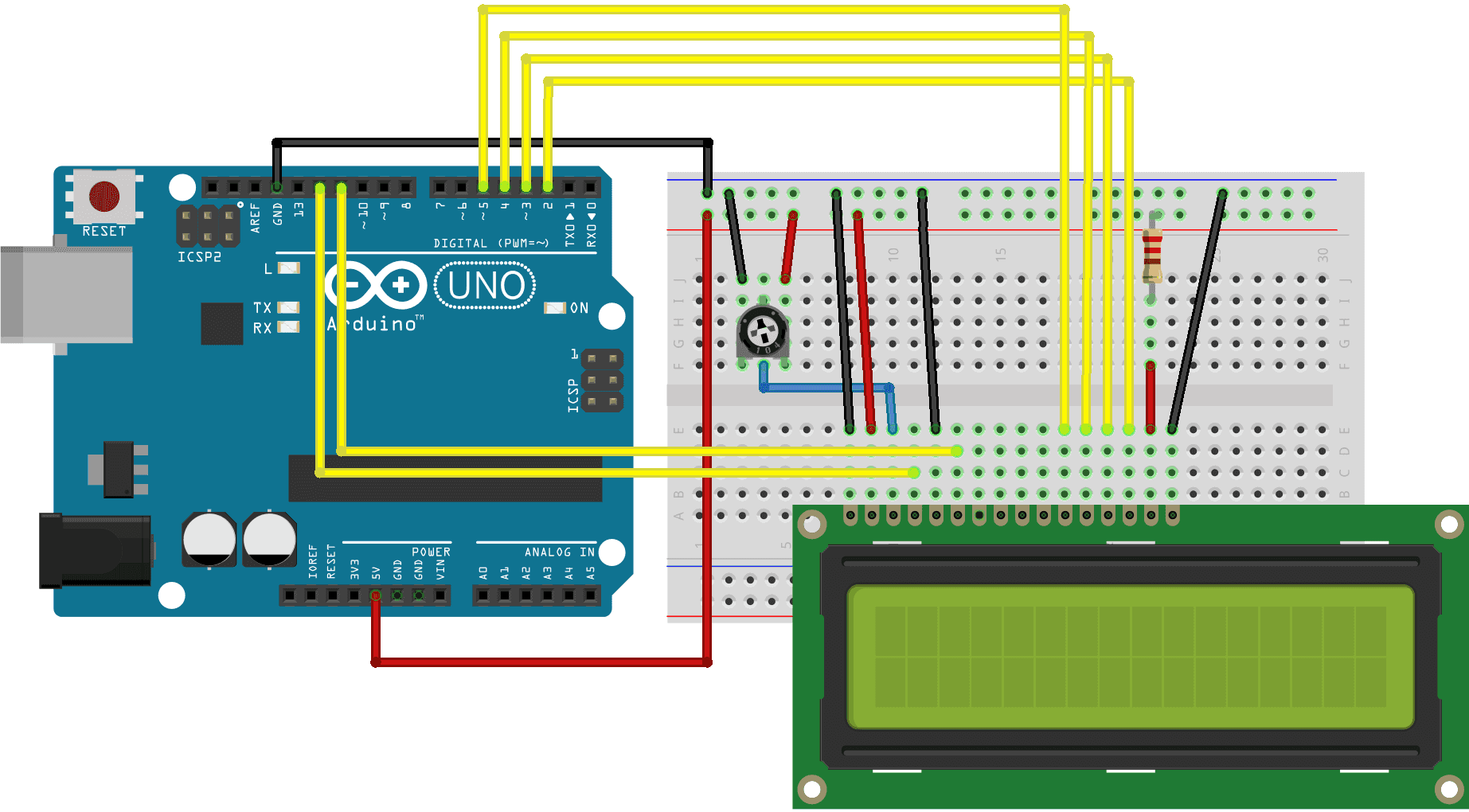
2. Arduino with LCd
Before wiring the LCD screen to your Arduino board we suggest to solder a pin header strip to the 14 (or 16) pin count connector of the LCD screen, as you can see in the image further up.
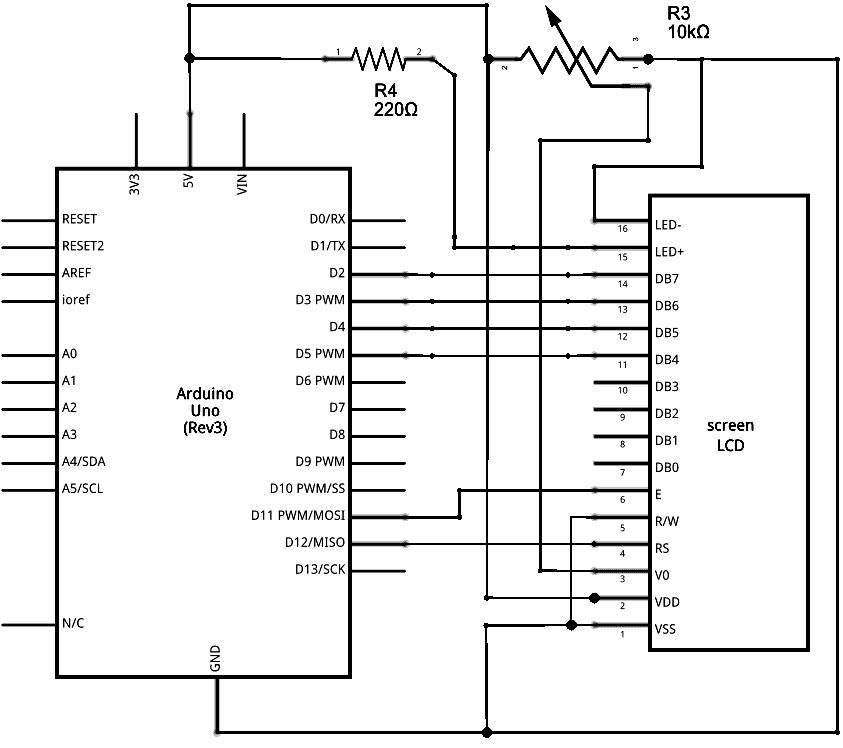
To wire your LCD screen to your board, connect the following pins:
LCD RS pin to digital pin 12
LCD Enable pin to digital pin 11
LCD D4 pin to digital pin 5
LCD D5 pin to digital pin 4
LCD D6 pin to digital pin 3
LCD D7 pin to digital pin 2
LCD R/W pin to GND
LCD VSS pin to GND
LCD VCC pin to 5V
LCD LED+ to 5V through a 220 ohm resistor
LCD LED- to GND
Additionally, wire a 10k potentiometer to +5V and GND, with it's wiper (output) to LCD screens VO pin (pin3).
.jpeg)


Comments
Post a Comment
Please Enter Your View And Feedback About This Page